In Lebanon, telling customers not to book on WhatsApp is like telling them not to knock on the door. They will message you anyway, and they are right to: it is where all business already happens.
The trick is not to fight the channel. It is to stop using a chat thread as a calendar. Here is the setup that keeps WhatsApp as your front door while the actual scheduling runs itself.
Why booking inside the chat breaks down
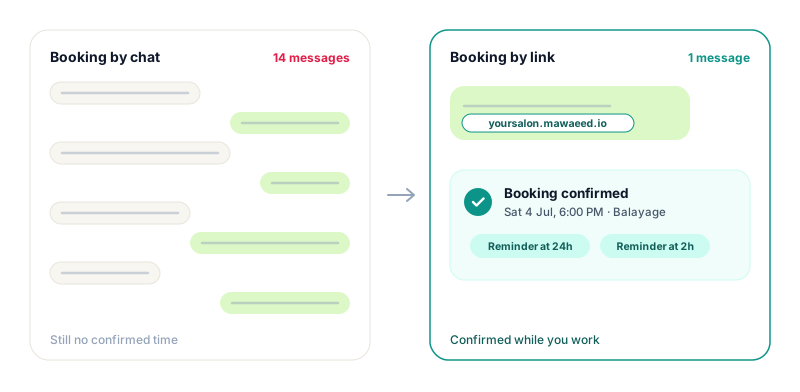
A booking negotiated by message takes a dozen replies on a good day: which day, which time, not that one, what about after five. Multiply by every client, and your evenings become unpaid secretarial work.
Worse, the chat has no memory that counts. The agreed slot lives somewhere in a scroll of messages, unrecorded, unreminded, and easy to double-book. Most no-shows in Lebanon are not rude clients; they are bookings that only ever existed as a chat bubble.
The one-saved-reply setup
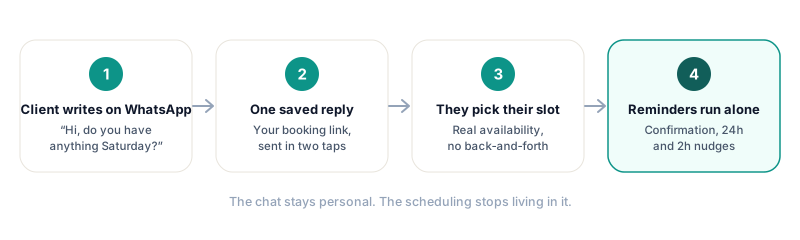
You do not need a chatbot, an API, or a business phone system. You need a booking page and one saved reply in WhatsApp Business. When someone asks for an appointment, you send the saved reply in two taps: a warm sentence plus your booking link.
Something like: "Hi! Easiest way is to grab your slot here, you will see all our free times: yourname.mawaeed.io". The customer picks a time from your real availability, gets an instant confirmation, and the appointment finally exists somewhere that is not a scroll of messages.
Set up the WhatsApp Business side in ten minutes
- Add your booking link to your WhatsApp Business profile and your Instagram bio, so half the askers never need to ask.
- Create a greeting message with the link, so first-time writers get it even before you see the chat.
- Save the booking reply as a quick reply (type a shortcut, get the full message), for everyone else.
- Keep an away message for closed hours that also carries the link: the midnight scroller books at midnight.
Let the reminders live on WhatsApp too
Getting the booking out of the chat is half the win. The other half is what happens before the appointment: a confirmation the moment they book, a reminder the day before, and a nudge two hours out.
Sent by hand this is a daily chore that gets skipped exactly on the busy days. Automated, it is the difference between hoping people remember and knowing they were reminded. With Mawaeed, those messages go out on WhatsApp automatically for every booking, with email as the backup channel.
Tip: Keep the chat for what chat is good at: questions, photos, directions, and the personal touch. The moment a message contains a date and a time, that belongs in the booking system.
What changes in practice
Businesses that switch to this setup describe the same before and after. Before: every booking costs ten messages, evenings are admin, and the calendar lives in your head. After: WhatsApp is where relationships happen, the booking page is where scheduling happens, and the two never fight.
The whole setup is one evening of work: create your booking page on Mawaeed, paste the link into three WhatsApp Business settings, and send your next "do you have Saturday?" the two-tap answer it deserves.
طبّق هذا عملياً مع مواعيد
جرّبه مجاناً لمدة 14 يوماً، بدون بطاقة. صفحة حجوزات أنيقة، وتذكيرات تلقائية، وجدول يمتلئ من تلقاء نفسه.